

The Ultimate Guide to Lighting, Audio & Camera Setups for Content Creators
Whether you’re a budding YouTuber, a podcaster, or a seasoned content creator, having the right lighting, audio, and camera setups can significantly impact the quality of your content. In today’s digital landscape, where attention spans are short and competition is fierce, investing in the best equipment on any budget is crucial for standing out. This comprehensive guide will explore various setups tailored for different budget ranges, ensuring you can create professional-quality content without breaking the bank.
Content creators at World Park understand the importance of high-quality production. With our professional podcast and video production studios available in Alpharetta, GA, we provide the perfect environment for creators looking to elevate their work. Whether you’re in need of a podcast studio or a video production studio, our facilities are designed to support your creative vision. In this guide, you will learn about essential equipment, budget-friendly options, and expert tips to ensure your content shines.
Understanding the Basics of Lighting, Audio, and Camera Setups
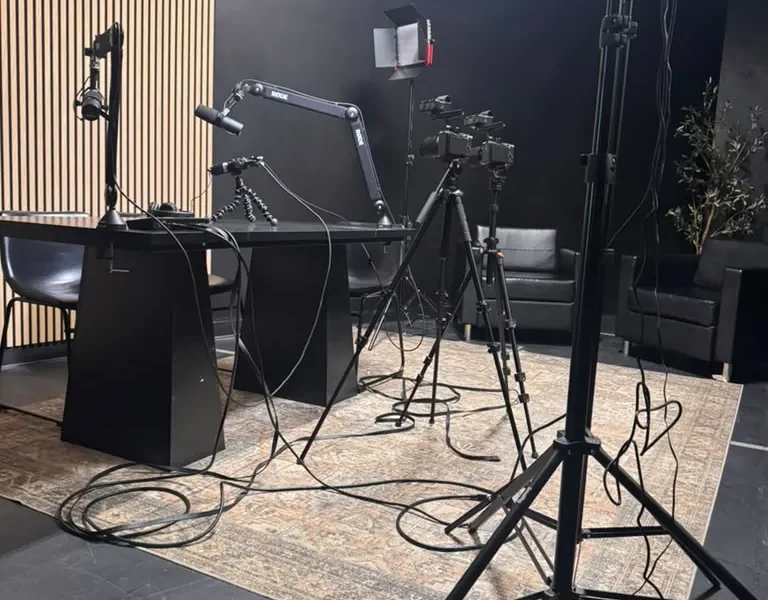
Before diving into specific equipment, it’s essential to grasp the fundamental components of a successful content creation setup. High-quality lighting, audio, and camera work together to create a polished final product. Here’s a brief overview of each component:
- Lighting: Good lighting enhances the visual quality of your content, making it more appealing to your audience. Proper lighting can also help set the mood and tone of your videos.
- Audio: Clear audio is just as important as high-quality visuals. Poor sound quality can distract viewers and detract from your message. Ensuring crisp, clear audio will keep your audience engaged.
- Camera: The camera you choose will impact the overall quality of your footage. From smartphones to professional DSLR cameras, understanding your needs and budget will help you select the right option.
Best Lighting Solutions for Content Creators
Lighting is a crucial aspect of video production. Here are some popular lighting solutions that cater to various budgets:
1. Natural Light
For those just starting or on a tight budget, natural light can be an excellent option. Position your setup near a window during the day to take advantage of soft, diffused sunlight. However, this method can be inconsistent due to changing weather and time of day.
2. LED Ring Lights
LED ring lights are popular among content creators for their affordability and versatility. They provide even lighting and are easily adjustable. Prices can range from $30 to $150 depending on size and features. A well-placed ring light can significantly enhance your video quality.
3. Softbox Lights
Softbox lights provide a more professional look by diffusing light to eliminate harsh shadows. They typically come in kits with multiple lights and stands, costing between $100 and $300. Softbox lights are ideal for those who want a studio-like setup.
4. Key Light and Fill Light Setup
For advanced creators, using a key light and fill light setup can enhance your production quality. The key light is the primary source, while the fill light softens shadows created by the key light. This setup can cost anywhere from $200 to $600 but provides a cinematic look.
Comparison Table: Lighting Options
| Lighting Type | Cost | Best For | Pros | Cons |
|---|---|---|---|---|
| Natural Light | Free | Beginners | Easy to use, soft light | Inconsistent |
| LED Ring Light | $30 – $150 | Vloggers, makeup artists | Even lighting, portable | Limited coverage |
| Softbox Lights | $100 – $300 | Professional setups | Soft light, minimal shadows | Bulky |
| Key & Fill Light | $200 – $600 | Cinematic production | High quality, versatile | Requires setup |
Audio Equipment Essentials for Clear Sound
Good audio quality can make or break your content. Here are some essential audio equipment options:
1. Lavalier Microphones
Lavalier microphones, or lapel mics, are discreet and ideal for interviews or on-the-go recording. They range from $20 to $300, with higher-end models offering better sound quality.
2. USB Microphones
USB microphones are perfect for podcasting and voiceovers. They easily connect to your computer and provide excellent sound quality. Prices range from $50 to $200. A popular choice is the Blue Yeti, known for its versatility and audio clarity.
3. Shotgun Microphones
Shotgun microphones are directional and ideal for capturing sound from a specific source while minimizing background noise. They are often used in video production and can range from $100 to $500.
4. Audio Interfaces
If you’re using XLR microphones, an audio interface is necessary to connect them to your computer. Interfaces can range from $100 to $500, offering various features such as phantom power and multiple inputs.
Comparison Table: Audio Equipment Options
| Microphone Type | Cost | Best For | Pros | Cons |
|---|---|---|---|---|
| Lavalier | $20 – $300 | Interviews | Discrete, good quality | Limited range |
| USB Microphone | $50 – $200 | Podcasts | Easy setup, great sound | Less versatile |
| Shotgun | $100 – $500 | Video production | Directional sound, reduces noise | Requires setup |
| Audio Interface | $100 – $500 | XLR microphones | High quality, multiple inputs | Complex for beginners |
Choosing the Right Camera for Your Needs
The camera you choose can significantly affect your content’s visual quality. Here are some options across various budget ranges:
1. Smartphone Cameras
Many modern smartphones have excellent cameras capable of recording high-quality video. For beginner content creators, this is often the best and most accessible option.
2. Compact Cameras
Compact cameras like the Canon G7X Mark III are portable and easy to use, making them great for vlogging. Prices range from $500 to $800.
3. Mirrorless Cameras
Mirrorless cameras, such as the Sony A6400, offer superior image quality and versatility. They typically range from $800 to $1,500 and are suitable for both video and photography.
4. DSLR Cameras
DSLR cameras provide exceptional quality and are great for serious content creators. The Canon EOS 90D is a popular choice, costing around $1,200.
Comparison Table: Camera Options
| Camera Type | Cost | Best For | Pros | Cons |
|---|---|---|---|---|
| Smartphone | Free (if owned) | Beginners | Convenient, portable | Limited features |
| Compact | $500 – $800 | Vlogging | Easy to use, lightweight | Less control |
| Mirrorless | $800 – $1,500 | Versatile content | High quality, interchangeable lenses | More expensive |
| DSLR | $1,200+ | Professional use | Exceptional quality, robust | Bulky |
Budget-Friendly Setups for Every Creator
Here’s how you can create a professional setup on a budget:
1. Starter Setup (Under $200)
- Lighting: Natural light or a small LED ring light
- Audio: Lavalier microphone
- Camera: Smartphone camera
2. Intermediate Setup ($500 – $800)
- Lighting: Softbox lights
- Audio: USB microphone
- Camera: Compact camera or entry-level mirrorless
3. Advanced Setup ($1,000+)
- Lighting: Key and fill light setup
- Audio: Shotgun microphone and audio interface
- Camera: Mirrorless or DSLR camera
Expert Tips for Optimizing Your Setup
To maximize your content quality, consider the following expert tips:
Additionally, invest in quality tripods and stabilizers to avoid shaky footage. When editing, focus on color correction and audio balancing for a polished final product.
Conclusion
Investing in the right lighting, audio, and camera setups is essential for content creators looking to enhance their production quality. By understanding your budget and needs, you can select equipment that elevates your content while staying within your financial constraints. At World Park, we provide access to professional studios and resources to help you create exceptional content. Whether you’re recording a podcast or filming a video, our facilities are designed to support your creative process.
Ready to elevate your content? Visit our podcast studio or video production studio in Alpharetta today!
Frequently Asked Questions
1. What lighting is best for video recording?
The best lighting for video recording includes LED ring lights and softbox lights, which provide even illumination and minimize shadows.
2. How can I improve my audio quality?
Investing in a quality microphone, such as a lavalier or USB microphone, can significantly enhance your audio quality.
3. Can I use my smartphone for video production?
Yes, many smartphones have excellent cameras capable of producing high-quality video content.
4. What is the best budget camera for content creation?
Compact cameras like the Canon G7X Mark III are great budget-friendly options for content creators.
5. How important is audio in video production?
Audio quality is crucial in video production; poor audio can distract viewers and detract from the content’s message.
6. What equipment do I need to start a podcast?
To start a podcast, you will need a quality microphone, headphones, and audio editing software.
7. How can I create a professional-looking video on a budget?
Utilizing natural light, a smartphone camera, and basic editing software can help you create professional-looking videos without a large budget.
8. What is the difference between a DSLR and a mirrorless camera?
DSLR cameras use a mirror mechanism for capturing images, while mirrorless cameras do not, allowing for a more compact design and faster shooting speeds.
