

Ultimate Guide to Planning Multi-Camera Video Production on a Budget
In today’s digital landscape, video content reigns supreme. For startups, media producers, and content creators, understanding how to plan and execute a multi-camera video production on a budget can set you apart in a crowded marketplace. This comprehensive guide will walk you through the essential steps, techniques, and insights needed to successfully create engaging multi-camera video productions without breaking the bank. Whether you’re in Alpharetta or beyond, this guide is designed to empower you with practical tips and expert advice, showcasing how World Park’s resources can support your video production needs.
Understanding Multi-Camera Video Production
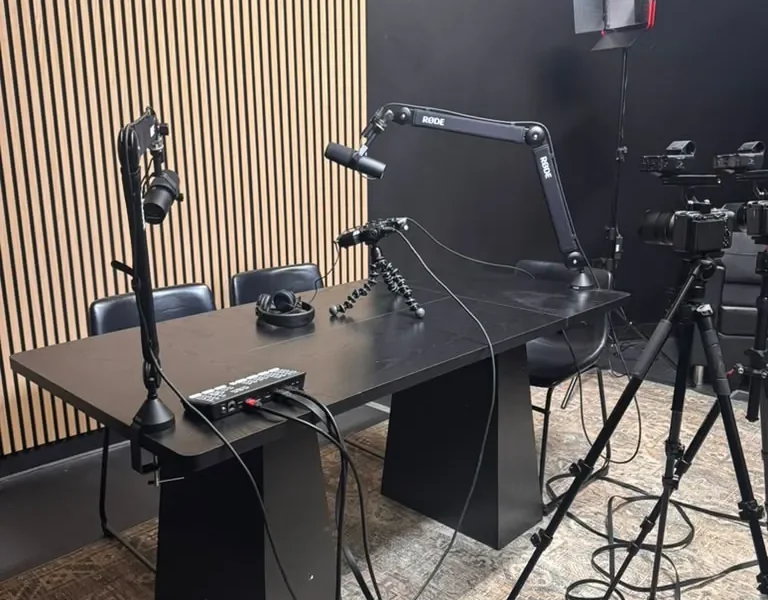
Multi-camera video production involves using multiple cameras to capture different angles and perspectives of a scene simultaneously. This technique is widely utilized in various formats, including live events, interviews, and television shows. The primary advantage of multi-camera setups is the ability to create dynamic and visually engaging content without the need for extensive reshoots.
According to a report by Statista, video traffic is expected to comprise 82% of all consumer internet traffic by 2022. Thus, leveraging multi-camera production can significantly enhance the quality and appeal of your video content.
Budgeting for Your Production
Before diving into the logistics of multi-camera video production, it’s crucial to establish a budget. Here’s a breakdown of key areas to consider:
- Equipment Costs: Cameras, lenses, tripods, and audio equipment.
- Location Expenses: Renting studio space or securing permits for outdoor shoots.
- Personnel: Hiring crew members, including camera operators and sound technicians.
- Post-Production: Editing software, color grading, and sound mixing services.
By identifying these costs upfront, you can allocate your budget more effectively. For instance, if you’re in Alpharetta, consider utilizing World Park’s video production studio for a professional yet budget-friendly solution.
Pre-Production Planning
Effective pre-production planning is vital for any successful video project. Here are the key steps to ensure your multi-camera shoot runs smoothly:
1. Define Your Objectives
What is the purpose of your video? Understanding your goals will guide your creative decisions and budget allocation. Whether it’s to promote a product, share a story, or educate your audience, clarity is essential.
2. Create a Shot List
A detailed shot list helps organize the specific angles and actions you want to capture. This list should align with your production objectives and ensure you utilize each camera effectively.
3. Storyboarding
Visualizing your shots through storyboards can prevent confusion during filming. This technique allows you to plan transitions and camera movements, ensuring a cohesive final product.
4. Schedule Your Shoot
Time management is critical. Create a shooting schedule that outlines each scene’s timing and the required equipment. Make sure to account for setup and breakdown times, especially when using multiple cameras.
Choosing the Right Equipment
Your choice of equipment can significantly impact the quality of your multi-camera production. Here are some recommendations:
Cameras
Invest in cameras that suit your budget while offering high-quality video output. Popular options include:
| Camera Model | Price Range | Key Features |
|---|---|---|
| Canon EOS Rebel T7 | $400-$600 | Full HD Video, Dual Pixel Autofocus |
| Panasonic Lumix GH5 | $1,200-$1,500 | 4K Video, Advanced Stabilization |
| Blackmagic Pocket Cinema Camera 6K | $1,300-$1,500 | Super 35 Sensor, 13 Stops Dynamic Range |
Audio Equipment
Quality audio is as important as visual quality. Consider investing in:
- Shotgun Microphones: Ideal for capturing directional sound.
- Lavalier Microphones: Perfect for interviews and presentations.
- Audio Recorders: Essential for capturing high-quality audio separately from your video.
For those in need of professional audio production, World Park’s podcast studio offers state-of-the-art equipment for your needs.
Shooting Your Multi-Camera Production
With your pre-production planning complete and equipment ready, it’s time to shoot. Here are some essential tips to keep in mind:
1. Camera Placement
Strategically position your cameras to capture different angles. Consider the following:
- Wide shots to establish the scene.
- Medium shots for dialogue.
- Close-ups for emotions and details.
2. Synchronize Your Cameras
To ensure a seamless edit, synchronize all cameras before shooting. Use a clapboard or a visual cue to align the footage in post-production.
3. Monitor Your Audio
Use headphones to monitor audio levels during the shoot. This will help you catch issues such as background noise or inconsistent levels early on.
Post-Production Tips
Post-production is where your multi-camera footage comes to life. Here are some best practices:
1. Editing Software
Choose editing software that meets your needs. Popular options include:
- Adobe Premiere Pro: Industry-standard with comprehensive features.
- Final Cut Pro: Excellent for Mac users with a user-friendly interface.
- DaVinci Resolve: Offers powerful color grading tools and is free to use.
2. Multi-Camera Editing
Most editing software allows you to sync and edit multiple camera angles easily. Take advantage of this feature to enhance your storytelling.
3. Color Grading and Sound Mixing
Invest time in color grading to ensure a consistent look across all footage. Additionally, sound mixing is crucial for balancing dialogue, music, and sound effects.
Expert Insights and Tips
Here are some actionable tips from industry experts to elevate your multi-camera production:
Frequently Asked Questions
What is multi-camera video production?
Multi-camera video production involves using multiple cameras to capture various angles of a scene simultaneously, creating a more dynamic viewing experience.
How can I produce a video on a budget?
To produce a video on a budget, plan meticulously, use affordable equipment, and leverage local resources like World Park’s studios for professional setups.
What equipment do I need for a multi-camera shoot?
Essential equipment includes multiple cameras, audio recording devices, tripods, lighting equipment, and editing software.
How do I synchronize multiple cameras during filming?
Use a clapboard or visual cue to help sync footage in post-production.
What are the best editing software options for multi-camera editing?
Popular editing software includes Adobe Premiere Pro, Final Cut Pro, and DaVinci Resolve.
How do I ensure good audio quality in my videos?
Use high-quality microphones, monitor audio levels during recording, and conduct sound mixing in post-production.
What is the importance of pre-production planning?
Pre-production planning helps streamline the shooting process, ensuring that all necessary shots are captured efficiently and effectively.
Can I rent video production equipment?
Yes, many local studios and equipment rental services offer video production gear at affordable rates.
Conclusion
Planning and executing a multi-camera video production on a budget is achievable with the right strategies and resources. By understanding the fundamentals of multi-camera setups, budgeting effectively, and leveraging local facilities like World Park, you can create impactful video content that resonates with your audience. As video continues to dominate digital marketing, investing in your production skills will pay dividends in reaching your goals.
