

Live Streaming for Business Events: A Complete Setup and Strategy Guide
In today’s digital landscape, live streaming for business events has emerged as a critical strategy for organizations looking to engage audiences, enhance reach, and create memorable experiences. Whether you are a startup in Alpharetta or an established enterprise in the Atlanta metropolitan area, understanding how to effectively set up and execute live streaming can differentiate your events from the competition. In this comprehensive guide, we will explore everything you need to know about live streaming for business events, from choosing the right equipment and software to strategies for maximizing engagement and reach.
Understanding the Importance of Live Streaming
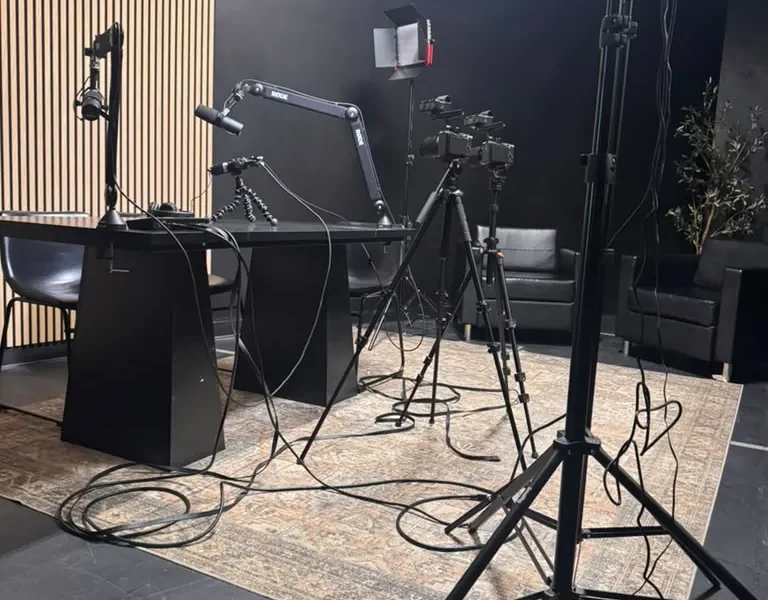
Live streaming is not just a trend; it’s a transformative tool that enables businesses to connect with audiences in real-time. According to a report by Statista, the global live streaming market is expected to reach $247 billion by 2027. This growth signifies the increasing demand for live content, particularly among entrepreneurs and startups who are looking to establish their brand presence.
For businesses in Alpharetta and the broader Atlanta area, leveraging live streaming can enhance visibility, foster community engagement, and provide a cost-effective alternative to traditional in-person events. Live streaming allows companies to reach a global audience, breaking geographical barriers and expanding their market reach.
Essential Equipment for Live Streaming
To ensure a professional live streaming experience, investing in the right equipment is crucial. Here’s a list of essential gear you’ll need:
- Camera: A high-definition camera is vital for clear video quality. Options range from DSLR cameras to dedicated live streaming cameras.
- Microphone: Audio quality is just as important as video quality. Consider using a lapel mic for individual speakers or a shotgun mic for group discussions.
- Lighting: Proper lighting can significantly enhance video quality. Softbox lights or ring lights can create a professional look.
- Encoder: An encoder converts your video into a digital format suitable for streaming. Hardware encoders are more reliable, but software options are available as well.
- Streaming Platform: Choose a platform that aligns with your audience’s preferences, such as YouTube Live, Facebook Live, or Vimeo.
For businesses utilizing coworking spaces or private offices at World Park, using professional-grade equipment can enhance your live streaming capabilities, providing a polished and engaging experience for viewers.
Choosing the Right Software
There are various software options available for live streaming, each offering unique features. Here are a few popular choices:
| Software | Features | Best For |
|---|---|---|
| OBS Studio | Free, customizable, supports multiple platforms | Beginners and advanced users |
| Wirecast | Professional-grade, multi-camera support, live switching | Businesses hosting large events |
| Streamlabs | Integrated chat, donation options, user-friendly interface | Content creators and streamers |
| vMix | Multi-camera support, graphics, instant replay | Professional live productions |
Choosing the right software depends on your specific needs, technical proficiency, and the scale of your event. For businesses in Alpharetta, utilizing a collaborative workspace like World Park can provide access to advanced technology and support for your live streaming endeavors.
Setting Up Your Live Stream
Once you have your equipment and software ready, it’s time to set up your live stream. Here’s a step-by-step guide:
- Plan Your Content: Outline the agenda, including speakers, topics, and any interactive segments.
- Test Your Equipment: Conduct a test run to ensure all equipment is functioning correctly and the audio and video quality meets your standards.
- Choose a Location: Select a quiet, well-lit space to minimize distractions and enhance production quality.
- Promote Your Event: Use social media, email newsletters, and your website to generate buzz around your live stream.
- Engage with Your Audience: Monitor comments and questions in real-time to foster interaction during the stream.
For more insights on operational excellence in live streaming setups, check out our article on consulting to drive operational excellence.
Strategies for Engaging Your Audience
Engagement is key to a successful live stream. Here are some strategies to keep your audience captivated:
- Interactive Polls and Q&A: Incorporate live polls and Q&A sessions to involve your audience actively.
- Use Visuals: Integrate graphics, slides, and videos to complement your presentation and maintain interest.
- Guest Speakers: Invite industry experts or influencers to share insights, enhancing credibility and attracting viewers.
- Follow-Up: Continue the conversation post-event by sending follow-up emails with highlights, recordings, and additional resources.
Promoting Your Live Stream
Effective promotion is essential to maximize attendance and engagement. Here are some promotional strategies:
- Social Media Marketing: Utilize platforms like LinkedIn, Twitter, and Instagram to share teasers and reminders.
- Email Campaigns: Send out invitations and reminders to your subscriber list, providing clear information on how to join the live stream.
- Partnerships: Collaborate with other businesses or influencers to broaden your audience reach.
- Leverage SEO: Optimize your promotional content with relevant keywords, including “live streaming for business events” to enhance discoverability.
For more information on effective marketing strategies, explore our insights on why Alpharetta is becoming a major startup hub.
Analyzing Post-Event Performance
After your live stream, it’s crucial to analyze its performance to improve future events. Key metrics to evaluate include:
- Viewership: Track the number of viewers and peak viewership times.
- Engagement Rates: Measure audience interactions such as comments, shares, and likes.
- Feedback: Collect feedback through surveys to understand viewer satisfaction and areas for improvement.
Utilizing analytics tools provided by your streaming platform can offer valuable insights into viewer behavior and preferences.
Conclusion
Live streaming for business events presents an incredible opportunity to connect with audiences, drive engagement, and expand your brand’s reach. By investing in the right equipment, software, and promotional strategies, you can create a seamless and impactful live streaming experience. For startups and businesses in Alpharetta, leveraging modern coworking spaces and technology infrastructure, like those at World Park, can enhance your live streaming capabilities. Start implementing these strategies today and watch your business events reach new heights!
FAQ
1. What equipment do I need for live streaming?
You will need a high-definition camera, a quality microphone, proper lighting, an encoder, and a reliable streaming platform.
2. How can I engage my audience during a live stream?
Incorporate interactive elements like polls, Q&A sessions, and guest speakers to keep your audience engaged.
3. What software is best for live streaming?
Popular options include OBS Studio, Wirecast, and vMix, each catering to different levels of expertise and event sizes.
4. How do I promote my live stream?
Utilize social media marketing, email campaigns, and partnerships to maximize your reach and attendance.
5. How can I analyze the performance of my live stream?
Evaluate metrics such as viewership numbers, engagement rates, and audience feedback to assess your event’s success.
6. What are the benefits of live streaming for businesses?
Live streaming enhances audience engagement, increases brand visibility, and allows businesses to reach a global audience.
7. Can I live stream from a coworking space?
Yes, many coworking spaces, like World Park, offer advanced technology and professional environments ideal for live streaming.
8. What should I consider when choosing a streaming platform?
Consider factors like audience preferences, platform features, and compatibility with your equipment.
9. How do I ensure good audio quality during my live stream?
Invest in a high-quality microphone and conduct sound checks before the event to ensure clear audio.
10. What is the average cost of live streaming equipment?
The cost can vary widely, but expect to spend anywhere from $500 to several thousand dollars depending on the quality of equipment.
11. How long should a live stream event be?
Typically, live streams should last between 30 minutes to 2 hours to maintain viewer engagement.
12. How can I repurpose my live stream content?
You can edit the recorded stream into shorter clips, create blog posts, or share highlights on social media.
