
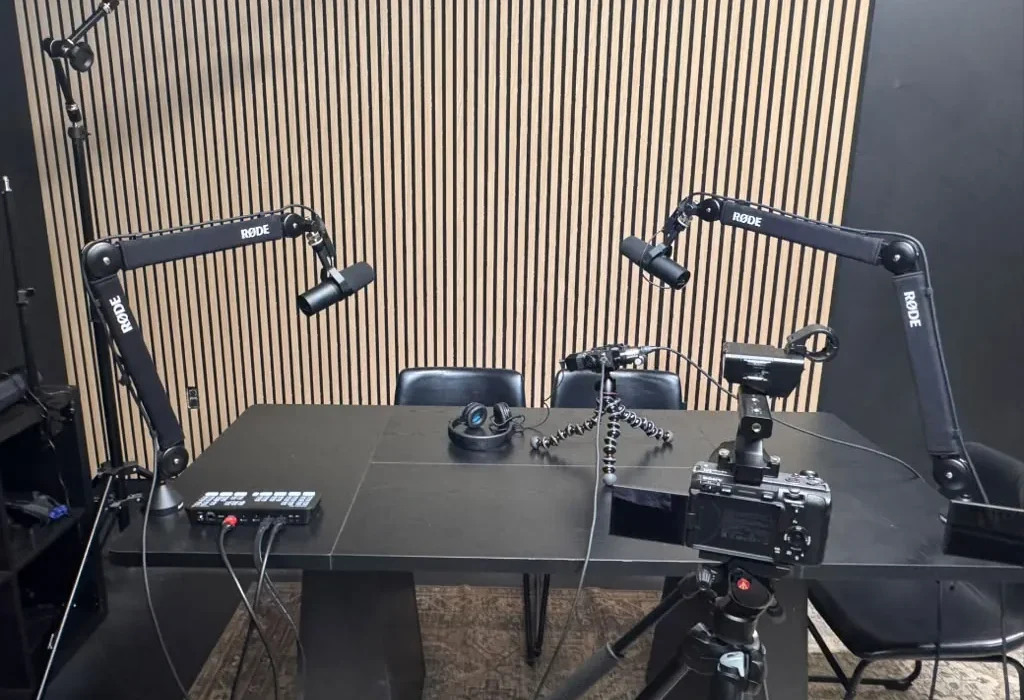
The Complete Guide to Video Podcasting: Equipment, Software & Best Practices
In recent years, video podcasting has surged in popularity, transforming the way creators engage with their audiences. With the right equipment, software, and best practices, anyone can start a successful video podcast. This comprehensive guide will walk you through everything you need to know about video podcasting, from choosing the right gear to mastering the art of production and distribution. Whether you’re a seasoned professional or a newcomer to the podcasting world, this guide will help you elevate your content to new heights.
Understanding Video Podcasting
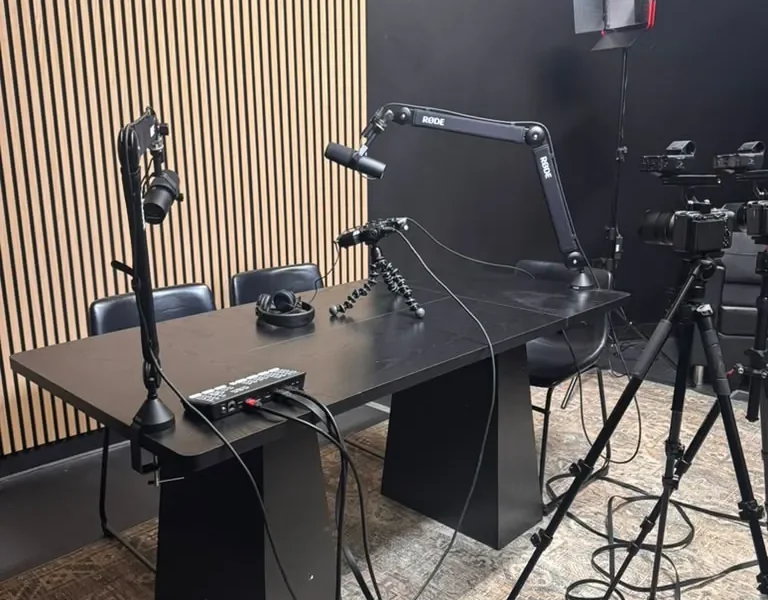
Video podcasting combines the engaging elements of traditional podcasting with the visual appeal of video. This format allows creators to connect with their audience on multiple sensory levels, enhancing the storytelling experience. According to a study by Pew Research, over 80% of podcast listeners prefer video content, making it a powerful medium for outreach and brand engagement.
Essential Equipment for Video Podcasting
Investing in the right equipment is crucial for producing high-quality video podcasts. Here’s a breakdown of the essential gear you’ll need:
Cameras
Your choice of camera will significantly impact the quality of your video podcast. Popular options include:
- DSLR Cameras: Known for their exceptional image quality, DSLRs like the Canon EOS Rebel series are great for video podcasting.
- Mirrorless Cameras: These offer similar quality to DSLRs but are typically lighter and more compact. The Sony Alpha series is a favorite among content creators.
- Webcams: For budget-friendly options, high-definition webcams like the Logitech C920 can deliver decent quality for video podcasting.
Microphones
Audio quality is just as important as video quality. Investing in a good microphone can drastically improve your podcast’s sound. Consider these options:
- Dynamic Microphones: The Shure SM7B is a popular choice for its rich sound quality and durability.
- Condenser Microphones: The Audio-Technica AT2020 offers a wide frequency response, making it ideal for voice recording.
- Lavalier Microphones: For a more discreet setup, lav mics like the Rode Wireless Go are excellent for interviews.
Lighting
Proper lighting can enhance the visual appeal of your video podcast. Here are some lighting options:
- Softbox Lights: These provide even, diffused lighting and are perfect for studio setups.
- Ring Lights: Ideal for face-to-camera shots, ring lights create a flattering glow and eliminate shadows.
- LED Panels: Versatile and adjustable, LED panels like the Neewer 660 can be used for various lighting setups.
Tripods and Stabilizers
To keep your camera steady, consider investing in a tripod or stabilizer. A sturdy tripod is essential for static shots, while gimbals or stabilizers are perfect for moving shots.
Video Production Studios
If you’re looking for a professional environment to record your video podcast, consider utilizing a dedicated podcast studio. At World Park in Alpharetta, GA, we provide modern facilities equipped with the latest technology to help you produce high-quality podcasts and videos.
Software Solutions for Video Podcasting
Alongside physical equipment, you’ll need software to manage your video podcast production. Here are some essential tools:
Video Editing Software
Editing is crucial for creating polished video podcasts. Consider these popular video editing software options:
- Adobe Premiere Pro: A professional-grade video editing software with advanced features.
- Final Cut Pro X: Ideal for Mac users, this software offers a user-friendly interface and powerful editing tools.
- DaVinci Resolve: Known for its color correction capabilities, this software is excellent for achieving a cinematic look.
Audio Editing Software
In addition to video editing, you’ll also want to edit your audio. Options include:
- Audacity: A free, open-source audio editing software that is easy to use.
- Adobe Audition: A professional audio editing tool that integrates well with Adobe Premiere Pro.
Streaming Software
If you plan to stream your video podcast live, consider using streaming software like OBS Studio or Streamlabs OBS. These tools allow you to mix audio and video sources seamlessly.
Best Practices for Video Podcasting
To ensure your video podcast stands out, consider the following best practices:
Content Planning
Start with a clear content plan. Define your target audience and choose topics that resonate with them. Research popular trends and incorporate them into your episodes.
Scriptwriting
While spontaneity can add authenticity, having a script or outline can keep your podcast focused and engaging. It helps you cover all key points without rambling.
Engagement Techniques
Engagement is key in video podcasting. Use techniques such as asking questions, encouraging viewer interaction, and incorporating visuals to keep your audience interested.
Branding
Develop a strong brand identity for your podcast. This includes creating a memorable logo, consistent color schemes, and a catchy podcast name that reflects your content.
Consistency
Release episodes on a consistent schedule. Whether it’s weekly, bi-weekly, or monthly, consistency helps build loyalty among your audience.
Editing Your Video Podcast
Editing is where your video podcast comes to life. Here’s a step-by-step guide to editing:
Importing Footage
Begin by importing all your recorded footage and audio into your editing software.
Syncing Audio and Video
Ensure your audio and video tracks are synchronized. Most editing software allows you to align these tracks easily.
Cutting Unnecessary Content
Trim any unnecessary content to keep your podcast engaging. Remove long pauses, filler words, and mistakes.
Adding Effects and Transitions
Enhance your video with effects and transitions. Use lower thirds to introduce guests and add background music to enhance the viewing experience.
Exporting Your Final Video
Once you’re satisfied with your edits, export your final video. Choose the appropriate format for your distribution platform, typically MP4 for online sharing.
Distributing Your Video Podcast
Once your video podcast is edited and polished, it’s time to distribute it. Here are some effective distribution strategies:
Podcast Hosting Platforms
Select a podcast hosting platform that supports video content. Popular options include:
- YouTube: The largest video-sharing platform, ideal for reaching a broad audience.
- Vimeo: Known for its high-quality video hosting and customization options.
- Libsyn: A podcast hosting service that also supports video content.
Social Media Promotion
Promote your video podcast on social media platforms like Facebook, Instagram, and Twitter. Create engaging snippets or trailers to entice viewers.
Email Marketing
Utilize your email list to notify subscribers about new episodes. Include links to your video podcast and encourage sharing.
Measuring Success and Engagement
To ensure your video podcast is successful, it’s essential to track performance metrics. Here are some key metrics to consider:
View Count
The number of views is a basic indicator of your podcast’s reach. Monitor this metric across all platforms.
Engagement Rate
Engagement rate measures how viewers interact with your content. Look for likes, comments, and shares as indicators of viewer interest.
Audience Retention
Analyze how long viewers are watching your videos. High audience retention rates indicate that your content is engaging.
Feedback and Reviews
Encourage viewers to leave feedback and reviews. This qualitative data can provide insights into what resonates with your audience.
FAQ
1. What equipment do I need for video podcasting?
You will need a camera, microphone, lighting, and editing software. Options include DSLRs, dynamic microphones, and softbox lights.
2. How long should my video podcast episodes be?
Episodes can vary in length, but aim for 20-60 minutes to keep your audience engaged.
3. Can I use a webcam for video podcasting?
Yes, high-definition webcams can provide decent quality for video podcasting, especially for those on a budget.
4. What software is best for editing video podcasts?
Popular options include Adobe Premiere Pro, Final Cut Pro X, and DaVinci Resolve.
5. How can I promote my video podcast?
Utilize social media, email marketing, and podcast hosting platforms to promote your video podcast.
6. What is the best way to monetize my video podcast?
Consider sponsorships, merchandise sales, and paid subscriptions as potential monetization strategies.
7. Do I need a script for my video podcast?
While not mandatory, having a script or outline can help keep your podcast focused and engaging.
8. How often should I release new episodes?
Maintain a consistent release schedule, whether weekly, bi-weekly, or monthly, to build audience loyalty.
9. What are the benefits of video podcasting over audio-only?
Video podcasting enhances engagement through visual storytelling, allowing for a richer viewer experience.
10. Can I edit my video podcast after recording?
Yes, editing is a crucial step that allows you to refine your content before distribution.
11. How can I measure the success of my video podcast?
Track metrics such as view count, engagement rate, audience retention, and feedback.
12. What is the best platform for hosting video podcasts?
Popular platforms include YouTube, Vimeo, and Libsyn, each offering unique features for video content.
In conclusion, video podcasting is a powerful medium that allows creators to connect with audiences more dynamically. By investing in the right equipment, utilizing effective software, and adhering to best practices, you can create engaging and professional-quality video podcasts. At World Park, we offer state-of-the-art facilities for podcast production, ensuring you have everything you need to succeed in your video podcasting journey. Start your video podcasting adventure today and elevate your content to new heights!
