
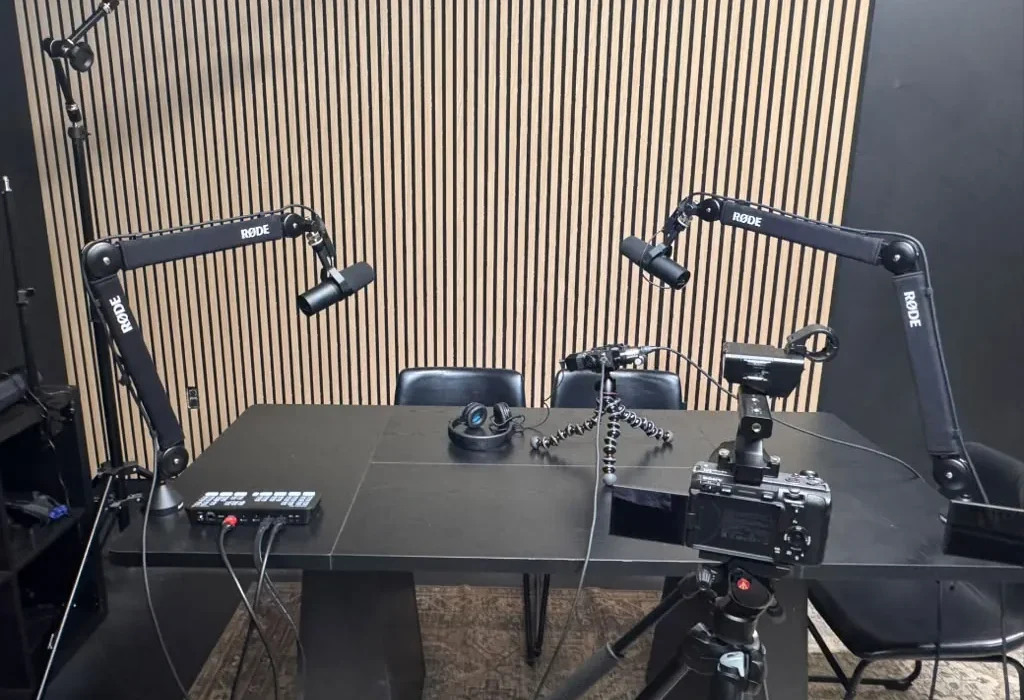
The Complete Guide to Podcast Video: Recording Video Versions of Audio Shows
In the ever-evolving landscape of digital content, the demand for engaging multimedia experiences continues to rise. As a result, many podcasters are now venturing into video—transforming their audio shows into captivating visual content. This comprehensive guide on podcast video will cover everything from the essentials of recording video versions of audio shows to the best practices for distribution and promotion. By the end of this article, you will have a clear understanding of how to effectively create and share video podcasts that resonate with your audience.
Understanding the Importance of Podcast Video
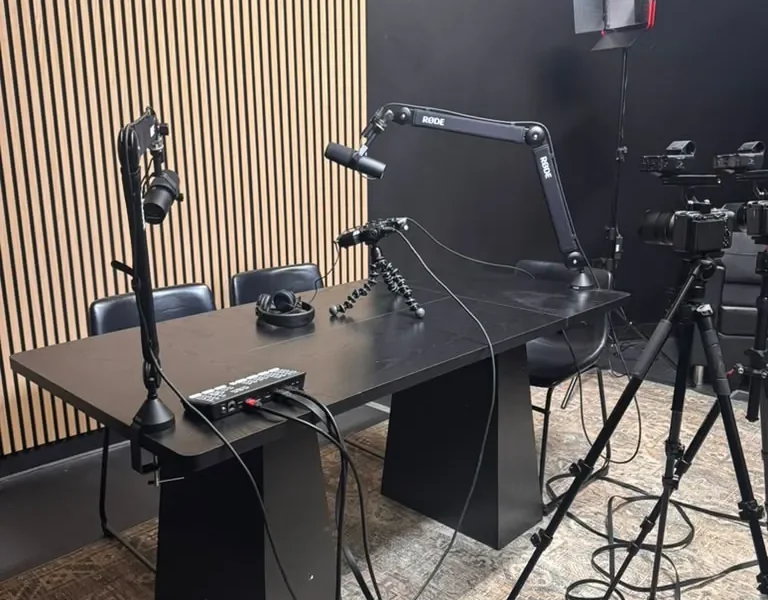
Podcast video is more than just a trend; it represents a significant evolution in how content is consumed. With platforms like YouTube, TikTok, and Instagram Reels gaining immense popularity, creators are leveraging video to enhance engagement and reach wider audiences. According to a report by Statista, the number of video streaming users worldwide is projected to reach 3.5 billion by 2025. This statistic highlights the potential for podcasters to tap into a vast audience by simply adding a visual component to their audio content.
Moreover, video podcasts allow for greater storytelling capabilities, enabling creators to showcase their personalities and connect with their audience on a more personal level. This connection can lead to increased loyalty and engagement, essential factors for any successful podcast.
Essential Equipment for Video Podcasting
To create high-quality video podcasts, investing in the right equipment is crucial. Here are some essential tools you will need:
- Camera: A good camera is vital for capturing clear and crisp video. You can use DSLRs, mirrorless cameras, or even high-quality webcams. For a budget-friendly option, consider the Logitech C920.
- Microphone: Audio quality is just as important as video quality. A high-quality microphone will ensure your voice is clear. Consider options like the Shure MV7 or Audio-Technica AT2020.
- Lighting: Proper lighting enhances video quality significantly. Softbox lights or ring lights can provide even illumination. The Neewer Ring Light is a popular choice among content creators.
- Video Editing Software: Post-production is where your video podcast comes to life. Software options like Adobe Premiere Pro and Final Cut Pro are excellent for editing.
Comparison Table: Essential Video Podcasting Equipment
| Equipment Type | Recommended Products | Price Range |
|---|---|---|
| Camera | Logitech C920 | $70-$100 |
| Microphone | Shure MV7 | $250-$300 |
| Lighting | Neewer Ring Light | $80-$130 |
| Editing Software | Adobe Premiere Pro | $20.99/month |
Setting Up Your Video Podcast Studio
Creating a conducive environment for your video podcast is essential. Here are key considerations for setting up your studio:
- Background: Choose a clean and visually appealing background. Consider using a backdrop that reflects your brand or theme.
- Soundproofing: Minimize background noise by adding soundproofing materials like acoustic panels. This will enhance audio quality.
- Camera Positioning: Position your camera at eye level to create a natural connection with viewers. Experiment with angles to find the most flattering shot.
Recording Your Video Podcast
Now that your equipment is set up, it’s time to record. Follow these steps for a successful recording session:
- Prepare Your Script: Outline your episode to ensure a smooth flow. Highlight key points and transitions.
- Test Your Equipment: Before recording, conduct tests on your camera and microphone to ensure everything is functioning correctly.
- Record in Segments: Break your episode into segments to make editing easier. This approach also allows for natural pauses and transitions.
- Engage with Your Audience: Look at the camera as if you are speaking to a friend. This will create a more intimate and engaging experience for viewers.
Editing Your Video Podcast
Editing is where you can enhance your podcast’s overall quality. Here are some editing tips:
- Remove Mistakes: Cut out any mistakes or awkward pauses to maintain a smooth flow.
- Add Visuals: Incorporate graphics, images, or video clips to support your content and keep viewers engaged.
- Include Music: Background music can enhance the mood of your podcast. Make sure to use royalty-free music to avoid copyright issues.
Publishing and Distributing Video Podcasts
Once your video podcast is edited, it’s time to publish and distribute it. Here are some platforms to consider:
- YouTube: The largest video-sharing platform, ideal for reaching a broad audience.
- Vimeo: A professional platform that offers advanced privacy settings and customization options.
- Social Media: Share snippets or highlights on platforms like Instagram, TikTok, or Facebook to drive traffic to your full episode.
Promoting Your Video Podcast
Promotion is crucial for gaining visibility. Here are effective strategies:
- Leverage SEO: Use SEO strategies to boost your video’s visibility in search engines. Research keywords and incorporate them into your video titles, descriptions, and tags.
- Collaborate with Influencers: Partner with influencers in your niche to broaden your reach and attract new viewers.
- Engage with Your Audience: Respond to comments and messages to build a community around your podcast. This engagement fosters loyalty and encourages sharing.
Expert Tips for Successful Video Podcasts
To create a standout video podcast, consider the following expert tips:
- Consistency is Key: Release episodes on a regular schedule to build anticipation among your audience.
- Invest in Quality: Prioritize high-quality audio and video over quantity. A well-produced episode will resonate more with viewers.
- Gather Feedback: Encourage your audience to provide feedback on your video podcast, and use this information to improve future episodes.
Frequently Asked Questions
What equipment do I need to start video podcasting?
To start video podcasting, you need a camera, microphone, lighting, and video editing software. Investing in quality equipment will enhance your production value.
How can I promote my video podcast effectively?
Promote your video podcast by leveraging SEO, collaborating with influencers, and engaging with your audience on social media platforms.
Is video podcasting more effective than audio-only podcasting?
Video podcasting can enhance audience engagement and reach a broader audience, but the choice depends on your content and target audience preferences.
What are the best platforms to publish my video podcast?
YouTube, Vimeo, and social media platforms are excellent choices for publishing and distributing your video podcast.
How often should I release new episodes?
Consistency is vital. Aim to release episodes on a regular schedule, whether weekly, bi-weekly, or monthly.
Can I repurpose audio episodes into video podcasts?
Yes, you can repurpose audio episodes into video podcasts by adding visuals, such as images or video clips, to enhance the viewer’s experience.
What is the ideal length for a video podcast?
The ideal length varies, but most video podcasts range from 20 to 60 minutes. Focus on delivering quality content rather than adhering to a specific time frame.
How can I improve my video podcast’s production quality?
Invest in quality equipment, pay attention to lighting and sound, and spend time on editing to enhance your video podcast’s production quality.
- The Complete Guide to Video Podcasting: Equipment, Software & Best Practices
- How to Recover from a Podcast Slump: Re-Engaging Your Audience After a Break
- The Ultimate Guide to Building a Loyal Podcast Community: Discord, Patreon & More
- The Future of Podcasting in 2027: AI, Interactive Audio & New Formats
- Podcast studio on campus
